You bought the software. Maybe it was Landlord Studio for the accounting, or August for compliance tracking, or Arthur Online because your portfolio outgrew spreadsheets.
And it helped — for a while. Bank feeds sync automatically. Rent reminders go out. Documents sit in one place instead of scattered across email and Dropbox.
But the admin still piles up.
You're still chasing late rent manually. Still forwarding maintenance photos to contractors over WhatsApp. Still copying tenant details between systems because nothing talks to anything else.
That's not a software problem. It's a workflow problem. And no property management platform on the market is built to solve it.
What property management software actually does
Most platforms do the same core things well: rent tracking, tenancy records, document storage, and basic accounting. Some add compliance checklists or bank feed syncing. A few include contractor directories.
These are single-step tasks. Software handles them fine.
But managing a rental portfolio isn't a series of single steps. It's a chain of connected processes — where one action should trigger the next automatically, but doesn't.
The result? You become the glue between your systems. You're the one remembering to chase rent on day three, escalate on day seven, and log the whole thing for your accountant. You're the workflow.
Three workflows your software can't handle
Here's where property management platforms consistently fall short. Not because they're bad products — but because they weren't designed for multi-step, rules-based processes.
1. Rent collection escalation
Every landlord has a version of this process in their head:
- Day 1: Rent's due. Send a reminder.
- Day 3: No payment. Send a follow-up.
- Day 7: Still nothing. Send a formal notice.
- Day 14: Escalate to a recovery process or flag for personal follow-up.
Most software sends the day-one reminder. Everything after that? Manual. You're checking bank statements, cross-referencing tenancy records, drafting emails, and hoping you don't miss one.
A proper automation handles the entire chain. Payment comes in? The sequence stops. Payment doesn't come in? The next step fires automatically — with the right template, the right tone, and a log of every action for your records.

2. Maintenance request to invoice matching
A tenant reports a leaking tap. Here's what should happen:
- The request gets logged with photos and property details.
- The right contractor gets notified based on the job type and location.
- The contractor completes the work and submits an invoice.
- The invoice gets checked against the original quote — if it's within tolerance, it's approved automatically.
- The cost gets logged against that property's maintenance spend.
- If annual maintenance spend crosses a threshold, you get an alert.
Here's what actually happens: you get a text from the tenant, forward it to a plumber on WhatsApp, chase the invoice three weeks later, file it in a folder you'll forget about, and reconcile it all at tax time.
No property management platform connects all of these steps. Arthur Online comes closest with its works order system, but even that stops short of automated invoice matching and spend tracking.
3. Tenant screening and onboarding
When a new tenant applies, the process should flow like this:
- Application form submitted (linked to the property listing).
- Documents uploaded and verified — ID, proof of income, references.
- Credit and affordability check run automatically via API.
- References requested by email with a standard template.
- Applicants scored and ranked.
- Offer sent, tenancy agreement generated, move-in checklist triggered.
Today, most landlords do this across five or six different tools: Rightmove for the listing, email for documents, a separate website for credit checks, Word for the tenancy agreement, and a mental checklist for everything else.
None of the major platforms — Landlord Studio, Arthur, Landlord Vision, August, or Hammock — offer integrated tenant screening with automated document verification and reference chasing. It's a manual process everywhere.
Why the gap exists
Property management software vendors build features, not processes. They add rent tracking, then compliance checklists, then bank feeds — each useful on its own, but none connected into end-to-end workflows.
There's a commercial reason for this too. Building a general-purpose platform means serving as many landlords as possible. Building process-specific automation means going deep on fewer use cases. Most vendors choose breadth.
The integration picture makes it worse. Landlord Vision has no API at all. Landlord Studio's integrations are limited to Xero and Plaid. August connects to almost nothing. Even Arthur Online, the most integration-friendly platform on the market, relies on Zapier for anything beyond its native connectors.
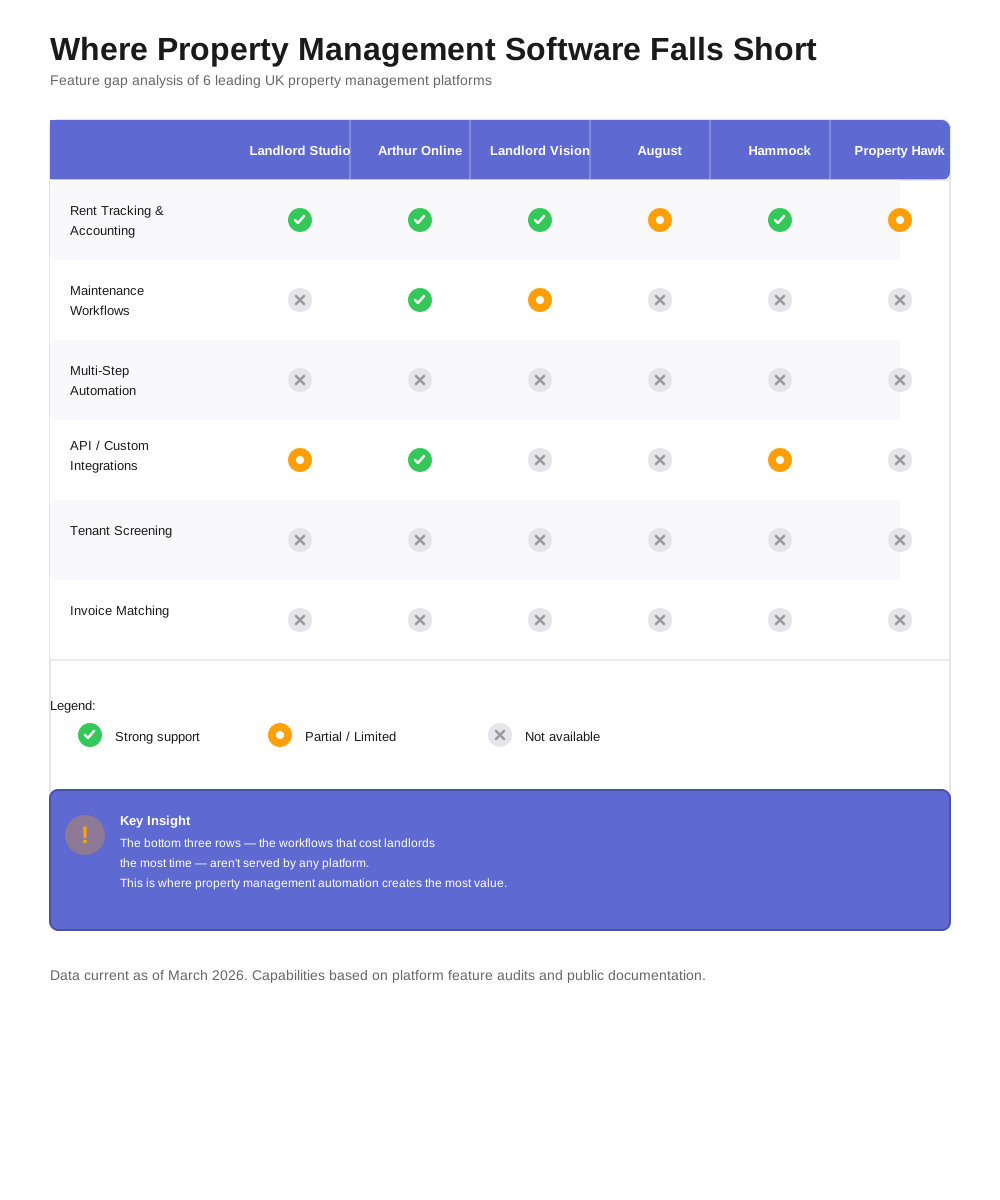
For a landlord managing 15 properties, this means either:
- Living with the gaps and doing the workflow steps manually, or
- Hiring a developer to build custom integrations — which is expensive and overkill for most portfolios.
There's a middle ground that barely exists yet: custom workflow automation built specifically for property management processes.
What actually fills the gap
The fix isn't a better property management platform. It's a layer of automation that sits between your existing tools and connects them into proper workflows.
Think of it like this: your software handles the data (rent records, tenancy details, documents). Workflow automation handles the process (what happens when rent is late, what triggers a contractor callout, how a new tenant moves from application to keys).
That's what we build. You define the rules once: "If rent is three days overdue, send this email. If seven days overdue, send this letter. If the contractor invoice is more than 10% above the quote, flag it for review."
Then it runs. Every time, for every tenant, for every property. No forgetting, no manual chasing, no spreadsheet cross-referencing. We handle the technical side — you just tell us how the process should work.
What this looks like in practice
Rent escalation, automated: Your bank feed shows a missed payment. The automation checks the tenancy record, confirms it's overdue, and sends the first reminder using your template. Three days later, if there's still no payment, it escalates — different template, different tone. At day fourteen, it creates a task for you to follow up personally and logs the entire history. You only step in when it actually needs a human.
Maintenance, from request to reconciliation: A tenant submits a form (built to your spec). The automation identifies the job type, pulls the right contractor from your directory, and sends them the details with property photos. When the contractor invoices, the automation matches it against the original request and flags anything unusual. The cost gets logged against the property, and your accountant sees it in Xero without you lifting a finger.
Tenant screening, streamlined: An applicant fills in a single form. Their documents upload to a secure folder. The automation triggers a credit check via API, sends reference request emails, and scores the applicant based on your criteria. You get a ranked shortlist with all the evidence attached — not a pile of emails to sort through.
The real numbers
The average small landlord spends 15 to 20 hours per month on admin that could be automated. At a portfolio of 15 properties, that's roughly a full working day every week spent on tasks that follow predictable, repeatable rules.
The three workflows above — rent escalation, maintenance management, and tenant screening — account for the bulk of that time. Automating them doesn't eliminate your involvement entirely. It eliminates the repetitive steps so your time goes to decisions, not data entry.
How to get started
You don't need to replace your current software. If Landlord Studio handles your accounting well, keep it. If August tracks your compliance, keep it. The point isn't to rip anything out — it's to connect what you have and fill the gaps with automation.
Start with the workflow that costs you the most time. For most landlords, that's either rent chasing or maintenance coordination. Map the steps, identify where you're doing manual work that follows a predictable pattern, and that's your first automation.
If you want help figuring out where to start, we run a free automation audit. It takes 30 minutes, we look at your current setup, and we'll tell you exactly which workflows would save you the most time — and whether automation is the right move for your situation. No pitch, no pressure. If it's not the right fit, we'll say so.